If you’re trying to break into IT or cybersecurity, chances are you’ve heard the same advice again and again: “Start with CompTIA.” But what does that actually mean? And how do you know which certification is right for your goals?
Many learners feel overwhelmed by the sheer number of options: A+, Network+, Security+, Linux+, CySA+, PenTest+, and now SecurityX. Some say you need all of them. Others say skip half. Most explanations online are surface level. The result: confusion, wasted time, and a pathway that feels more like guesswork than strategy.
Let’s fix that with a clear, modern, practical breakdown of how the CompTIA certification stack actually works today.
What We’ll Cover
This guide explains the full CompTIA certification pathway, stackable progression, exam formats, industry recognition, role alignment, pros and cons, and FAQs. You’ll learn how to choose certifications that match your career goals instead of relying on outdated or generic advice.
Below is a structured summary of what this post covers at a glance.
| Topic | What You’ll Learn |
|---|---|
| 1. Certification Pathway Overview | How A+, Network+, Security+, Linux+, CySA+, PenTest+, and SecurityX flow together in a modern pathway, when to take each one, and how they support cybersecurity and cloud careers. |
| 2. Core Certifications | A detailed breakdown of foundational exams like A+, Network+, and Security+ including what each covers, ideal learners, and how these certifications establish baseline technical and security skills. |
| 3. Advanced Certifications | Analysis of Linux+, CySA+, PenTest+, and SecurityX with coverage of detection and response, Linux administration, offensive testing principles, and enterprise security capabilities for advanced roles. |
| 4. Exam Formats & Difficulty | Explanation of multiple-choice questions, PBQs, performance tasks, real-world scenarios, troubleshooting logic, and how exam complexity increases through the certification pathway. |
| 5. Pros and Cons of CompTIA Certifications | Objective evaluation of strengths such as industry recognition, structured progression, and job relevance, alongside limitations such as cost, overlap, or insufficient depth for senior roles. |
| 6. Maximizing Certification Value | Strategies for gaining maximum career impact by pairing each certification with hands-on labs, real or simulated job tasks, and role-aligned projects that build practical skills. |
| 7. Common Mistakes and Questions | Frequent issues such as taking exams out of order, relying on memorization, skipping hands-on practice, misunderstanding stackable certs, or expecting certifications alone to secure jobs, along with clear answers to the most common questions learners ask. |
Understanding The CompTIA Pathway
CompTIA certifications follow a progression that starts with fundamentals and expands into infrastructure, security, and advanced enterprise skills. This structure is intentional, each certification builds the knowledge required for the next, giving you a clear way to assess where you are today and choose the certification that matches your current skill level.
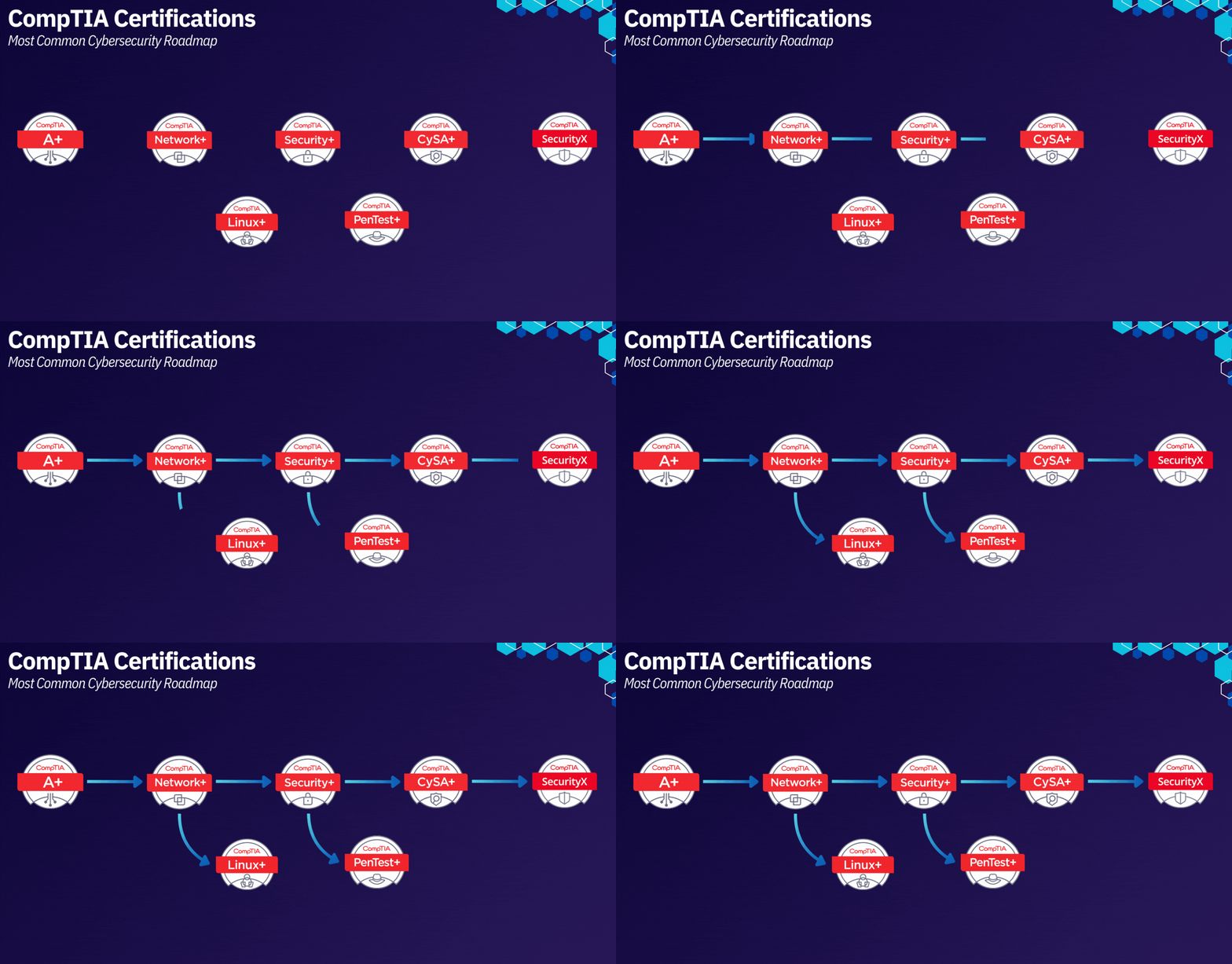
The pathway matters because it creates a predictable IT career roadmap instead of learning in random directions or wasting time on material that’s too advanced or not aligned with your goals. The common learning sequence looks like this:
A+ → Network+ → Security+ → (Linux+) → CySA+ or PenTest+ → SecurityX
Why this order?
1. It builds layered technical understanding.
Each certification introduces new concepts only after you’ve built the foundation beneath them. For example, Network+ makes far more sense once A+ troubleshooting fundamentals are in place, and Security+ security architecture is easier when networking principles are solid.
2. It aligns with hiring manager expectations.
Recruiters and managers often look for this exact progression when hiring early-career IT and cybersecurity professionals. It shows structured learning, not random studying.
3. It creates stackable IT certifications instead of siloed knowledge.
The pathway is designed so you can stack skills in a logical order, not jump around and miss core concepts that advanced exams assume you already know.
4. It supports roles across IT, cybersecurity, and cloud.
Because the pathway is broad at the foundation and specialized at the top, it works for learners targeting IT support, SOC analyst roles, cloud security, or penetration testing.
5. Most importantly, the pathway lets you enter at the right level.
If you already understand PC hardware and operating systems, you can start at Network+. If you have networking experience, you can move directly into Security+. If you’re already familiar with security or Linux administration, you can go straight into CySA+ or PenTest+. The pathway is not rigid — it’s designed to meet you where you are and guide you toward where you want to go.
1. A+: Foundation for IT Support
A+ gives absolute beginners the structure and confidence required to operate in technical support environments. It focuses on device fundamentals, troubleshooting, and user support workflows.
What You Learn
-
Hardware and operating system fundamentals
-
Troubleshooting methodologies
-
Basic networking
-
Ticketing systems and professional workflows
Who Should Start Here
-
Career switchers
-
Entry-level help desk or IT support candidates
-
Learners without technical experience
How popular it is on job boards
A+ appears frequently in listings for:
-
Help desk technician
-
Desktop support
-
IT support specialist
It is one of the most recognized certifications for technical support roles but less common in cybersecurity or cloud postings.
Official CompTIA link
https://www.comptia.org/certifications/a
2. Network+: Core Networking for All IT Roles
Network+ transitions learners from device-level troubleshooting into infrastructure-level understanding. It provides essential networking fundamentals for all cybersecurity and cloud roles.
Skills Gained
-
TCP/IP understanding
-
Routing and switching
-
Network operations and monitoring
-
Wi-Fi, VPN, and WAN architectures
-
Network security basics
Who Should Take Network+
-
Support professionals leveling up
-
Cloud learners needing networking foundations
-
Cybersecurity beginners preparing for Security+
How popular it is on job boards
Network+ is highly visible in:
-
Network technician
-
IT support specialist
-
Junior network administrator
It’s less common than Security+ but more common than Linux+ or PenTest+.
Official CompTIA link
https://www.comptia.org/certifications/network
3. Security+: Baseline Cybersecurity Certification
Security+ is the most popular and widely required entry-level cybersecurity certification worldwide. It validates foundational security knowledge and is the launchpad into blue-team, cloud security, and engineering roles.
What You Learn
-
Common threats and mitigations
-
IAM fundamentals
-
Secure design principles
-
Cryptography basics
-
Incident response
Who Should Take Security+
-
IT professionals transitioning into cybersecurity
-
SOC analyst candidates
-
Cloud security learners
-
Anyone preparing for CySA+ or SecurityX
How popular it is on job boards
Security+ is the most frequently listed entry-level security certification, appearing in:
-
SOC Analyst I/II
-
Cybersecurity Specialist
-
Junior Security Engineer
-
IT Security Technician
It is also required for many roles under the U.S. DoD 8570 directive.
Official CompTIA link
https://www.comptia.org/certifications/security
4. Linux+: Optional but Highly Valuable
Linux+ builds command-line proficiency and system understanding across Linux-based environments. While extremely valuable, it appears less often on job boards by name—but Linux skills appear everywhere.
What Linux+ Covers
-
CLI proficiency
-
System administration fundamentals
-
File permissions and access control
-
Networking and process management
-
Hardening and security
Who Should Take Linux+
-
SOC analysts working with SIEM log sources
-
Cloud and DevOps learners
-
Security engineers who need OS-level depth
How popular it is on job boards
Linux is one of the most requested skills, but Linux+ as a certification is less frequently listed.
You’ll see Linux knowledge required in:
-
Cloud roles
-
Cybersecurity operations
-
DevOps and automation
-
System administration
Linux+ boosts technical credibility even if not explicitly listed.
Official CompTIA link
https://www.comptia.org/certifications/linux
5. CySA+: Detection and Response for SOC Analysts
CySA+ focuses on blue-team capabilities, including threat detection, security monitoring, and incident response. It is a natural next step after Security+.
Core Skills
-
Log analysis and correlation
-
SIEM operations
-
Threat detection
-
Vulnerability management
-
Incident response
Who Should Take CySA+
-
SOC Analyst I–II candidates
-
Learners moving deeper into cybersecurity operations
-
Security+ holders advancing in blue-team skills
How popular it is on job boards
CySA+ is increasingly common and appears regularly in:
-
SOC roles
-
Security monitoring and analysis roles
-
MSSP / SOC service provider positions
Not as ubiquitous as Security+, but highly relevant for operational security roles.
Official CompTIA link
https://www.comptia.org/certifications/cybersecurity-analyst
6. PenTest+: Structured Offensive Security Certification
PenTest+ introduces structured penetration testing processes used in real consulting and red-team environments.
What You Learn
-
Reconnaissance and scanning
-
Manual exploitation
-
Post-exploitation
-
Reporting and communication
-
Legal and ethical constraints
Who Should Take PenTest+
-
Aspiring penetration testers
-
Red team beginners
-
Security engineers wanting offensive perspective
How popular it is on job boards
PenTest+ appears on job boards less frequently than Security+ or CySA+.
It shows up most in:
-
Junior penetration tester roles
-
AppSec testing roles
-
Security consulting positions
Its popularity is growing, but OSCP-style certifications still dominate offensive roles.
Official CompTIA link
https://www.comptia.org/certifications/pentest
7. SecurityX: Enterprise-Level Security Knowledge
SecurityX is CompTIA’s most advanced security certification, replacing CASP+. It focuses on architectural, governance, and engineering-level security knowledge.
Key Topics
-
Zero trust architecture
-
Hybrid-cloud and multi-cloud security
-
Identity-centric security models
-
Governance, risk, and compliance
-
Security engineering practices
Who Should Take SecurityX
-
Security engineers
-
Senior analysts
-
Cloud security professionals
-
Aspiring security architects
How popular it is on job boards
SecurityX is new and not yet widely listed, so explicit demand is lower than Security+ or CySA+.
However, the skills it certifies—zero trust, cloud security, IAM—are in extremely high demand based on job descriptions.
Official CompTIA link
https://www.comptia.org/certifications/securityx
Other CompTIA Certifications Worth Knowing About
CompTIA offers additional certifications outside the core cybersecurity pathway. While less common on job boards, they can be valuable depending on your specialization:
-
Cloud+ – Cloud infrastructure and virtualization fundamentals
-
Data+ – Entry-level data analytics
-
Project+ – IT project management basics
-
Server+ – Server hardware, virtualization, and operations
-
CASP+ (legacy) – Replaced by SecurityX
-
ITF+ (IT Fundamentals) – For brand-new learners exploring IT
These certifications aren’t as widely required as the main stack (A+, Network+, Security+, CySA+, PenTest+, SecurityX), but they fill niche or specialized roles depending on the career path.
Exam Formats and Difficulty
CompTIA exam formats become progressively more complex as you move through the certification pathway. Early exams focus on foundational knowledge, while advanced exams test deeper analytical thinking, security reasoning, and multi-step problem solving.
Regardless of the certification, all CompTIA exams use a mix of the following:
1. Multiple-Choice Questions (MCQs)
These questions test conceptual understanding, definitions, and the ability to apply knowledge across common IT scenarios.
-
A+ uses more direct questions (definitions, troubleshooting steps).
-
Security+ introduces scenario-heavy MCQs requiring judgment and prioritization.
-
CySA+ and PenTest+ require interpreting logs, attack patterns, or output from tools.
2. Performance-Based Questions (PBQs)
PBQs simulate real environments, requiring hands-on reasoning, configuration steps, or multi-step analysis.
Examples include:
-
Sorting firewall rules
-
Analyzing log entries
-
Identifying misconfigurations
-
Selecting correct CLI commands
-
Matching vulnerabilities to attack methods
PBQs are where most candidates struggle because they test understanding, not memorization.
3. Scenario-Based Problem Solving
Scenarios become increasingly realistic and multi-dimensional at higher levels:
-
Network+ might ask you to troubleshoot routing across multiple sites.
-
Security+ may present an incident scenario requiring prioritization.
-
CySA+ often includes logs, SIEM outputs, or vulnerability scans you must interpret.
-
PenTest+ gives reconnaissance data or exploitation paths to evaluate.
The higher the exam, the more it mimics real-world cyber operations.
4. Realistic Time Constraints
Most exams last 90 minutes to 165 minutes depending on difficulty, and performance-based sections can consume a large portion of time if not managed well.
-
A+ → Two exams, each 90 minutes
-
Network+ → 90 minutes
-
Security+ → 90 minutes
-
Linux+ → 90 minutes
-
CySA+ → 165 minutes
-
PenTest+ → 165 minutes
-
SecurityX → Approximately 165 minutes with architect-level scenarios
Advanced certifications test not just what you know, but how efficiently you can apply it.
How Difficult are CompTIA Exams Overall?
CompTIA exams increase in difficulty as you move from fundamentals into security, analytics, and engineering roles. Here’s the progression at a glance:
A+ — Practical, entry-level
Broad coverage of hardware, OS, and troubleshooting. Straightforward, but content-heavy.
Difficulty: 3.5/10
Network+ — Moderate, logic-based
You must understand how networks function, read diagrams, and troubleshoot connectivity issues.
Difficulty: 5/10
Security+ — Intermediate, scenario-focused
Questions simulate real security incidents. Often requires selecting the best answer, not just a correct one.
Difficulty: 6/10
Linux+ — Technical, hands-on
Command-line skills and system behavior matter. Challenging for learners new to Linux environments.
Difficulty: 7/10
PenTest+ — High difficulty, offensive mindset
Tests enumeration, exploitation logic, and reporting. More realistic than entry-level exams, but not OSCP-level intense.
Difficulty: 8.0/10
CySA+ — High difficulty, analytical
Focuses on logs, alerts, SIEM data, vulnerabilities, and real SOC investigations.
Difficulty: 8.5/10
SecurityX — Very high difficulty, architecture-level
Zero trust, hybrid-cloud security, identity models, and strategic security decisions. Requires professional reasoning, not memorization.
Difficulty: 10/10
Overall: the pathway shifts from recall → understanding → real-world analysis and decision making as you move up.
Pros and Cons of CompTIA Certifications
CompTIA certifications are widely used across IT and cybersecurity, but they come with strengths and limitations depending on your goals. Here’s a clear breakdown.
Pros
Widely recognized across IT and cybersecurity roles: CompTIA certifications are accepted globally and appear in thousands of job listings, especially A+, Network+, and Security+.
Structured, progressive learning pathway: A+, Network+, and Security+ build fundamentals before deeper certifications like CySA+ or PenTest+.
Strong alignment with real-world job expectations: Security+, in particular, matches what many hiring managers expect from entry-level candidates.
Vendor-neutral training: Skills apply across Windows, Linux, cloud platforms, and security tools.
Ideal starting point for career switchers: The pathway gives new learners clarity and removes guesswork from where to begin.
Cons
Advanced certifications are less popular on job boards: Linux+, PenTest+, and SecurityX appear far less frequently compared to Security+.
Certification costs can add up quickly: Without vouchers or discounts, exam pricing is a barrier for many learners.
Not always deep enough for specialized roles: Security+ and CySA+ teach fundamentals but do not replace advanced engineering or cloud certifications.
Hands-on practice isn’t included by default: Learners must seek external labs, virtual machines, or cloud platforms to build real experience.
Potential overlap between certifications: Topics such as security controls or networking fundamentals appear in multiple exams.
How to Get the Most Value From CompTIA Certifications
CompTIA certifications become far more powerful when paired with real hands-on experience. The goal is not just to pass an exam, but to demonstrate practical skills that employers can trust. Here’s how to maximize the value of every certification you earn.
1. Pair your certification with hands-on labs and real projects
Certifications validate knowledge, but projects prove competence.
After each certification, build or practice with:
-
Virtual labs (TryHackMe, HackTheBox, Immersive Labs)
-
Home labs using VirtualBox, VMware, or Proxmox
-
Cloud labs on AWS, Azure, or GCP
-
Linux servers, SIEM tools, packet captures, or vulnerability scanners
Every practical exercise makes the certification more meaningful — and more impressive to hiring managers.
2. Apply the skills in a real environment whenever possible
Even limited IT or cybersecurity exposure turns certifications into applied knowledge.
Examples include:
-
Help desk work that uses A+ concepts
-
Troubleshooting networks with Network+ principles
-
Applying Security+ ideas during onboarding tasks
-
Using Linux+ skills to manage servers or write scripts
-
Practicing CySA+ investigations using actual SIEM alerts
The best way to validate learning is through real or simulated job tasks.
3. Don’t chase badges, build skill depth
A common mistake is stacking certifications without mastering the underlying skills.
To avoid this:
-
Treat each certification as a skill-building milestone
-
Spend time practicing before moving to the next level
-
Ensure you can explain and apply the concepts, not just recall them
Hiring managers care far more about what you can do than what you passed.
4. Be able to clearly talk about what you learned
When interviewing, you should be able to explain:
-
What concepts you learned
-
How you applied them
-
What tools you used
-
What problems you solved
-
How the certification changed the way you think about technology
This transforms the certification from “a requirement you completed” into evidence of real capability.
5. Build a simple portfolio documenting your journey
After each certification, create:
-
A short write-up of what you learned
-
Screenshots or summaries of labs you completed
-
Notes on challenges you solved
-
Small case studies or project breakdowns
This helps recruiters see your progression and gives you strong talking points during interviews.
6. Use certifications as stepping stones, not final destinations
A+, Network+, Security+, and others are not endpoints. They exist to help you:
-
Enter IT support
-
Transition into cybersecurity
-
Build toward cloud engineering
-
Develop into SOC or security operations roles
The real value comes from how you use the certifications to structure your learning and open new opportunities.
Most Frequent Questions
Is Security+ enough to get a cybersecurity job?
Security+ alone is rarely enough, but it’s a strong baseline certification and often a minimum requirement for entry-level roles.
To be competitive, pair it with:
-
Hands-on labs
-
Basic Linux skills
-
A small home lab or cloud lab
-
A simple project portfolio
- Some IT-related experience
Security+ gets you interviews — skills and projects get you hired.
How long does it take to study for a CompTIA certification?
Typical study timelines:
-
A+: 8–12 weeks
-
Network+: 6–10 weeks
-
Security+: 6–12 weeks
-
Linux+: 10–14 weeks
-
CySA+ / PenTest+: 10–16+ weeks
Time varies based on whether you study full-time, part-time, or already have IT experience.
Are CompTIA exams difficult?
Difficulty increases through the pathway:
-
A+: Entry-level, broad but manageable
-
Network+: Intermediate networking logic
-
Security+: Scenario-heavy, requires judgment
-
Linux+: Technical and hands-on
-
CySA+: High difficulty, log and SIEM analysis
-
PenTest+: High difficulty, offensive workflows
-
SecurityX: Very high difficulty, architecture-level reasoning
The exams test application, not just memorization.
Do CompTIA certifications expire?
Yes. Most certifications are valid for three years.
Security+, CySA+, and PenTest+ can be renewed through:
-
Continuing Education Units (CEUs)
-
Completing higher-level certifications
-
Taking the latest version of the exam
SecurityX uses a similar CE renewal cycle.
Are CompTIA certifications worth it for beginners?
Absolutely, especially for learners without IT experience.
CompTIA certifications:
-
Provide structure
-
Build foundational skills
-
Are widely recognized by employers
-
Help career switchers enter IT faster
-
Support multiple pathways (cybersecurity, cloud, support, SOC)
They are most valuable when paired with projects, labs, and the ability to demonstrate what you learned.
What are stackable certifications, and do they matter?
Stackable certifications are combinations of CompTIA certs that show a clear, intentional learning path, for example:
-
IT Operations Specialist → A+ + Network+
-
Security Analytics Professional → Security+ + CySA+
-
PenTest Operations Specialist → Security+ + PenTest+
-
Linux Network Professional → Network+ + Linux+
They’re not usually listed in job postings, and many employers don’t recognize the “stackable” label itself, but the underlying certifications are very relevant.