Free Security+ Practice Exam Simulator
Train with a realistic Security+ SY0-701 practice exam simulator built for focused, domain-based preparation. Timed exam mode, instant feedback, and full objective coverage.
✅ Practice with explanations after each answer
✅ Full Exam Mode with timed session
✅ Flexible domain selection during practice
✅ 10–90 question session options
✅ Clean browser-based experience
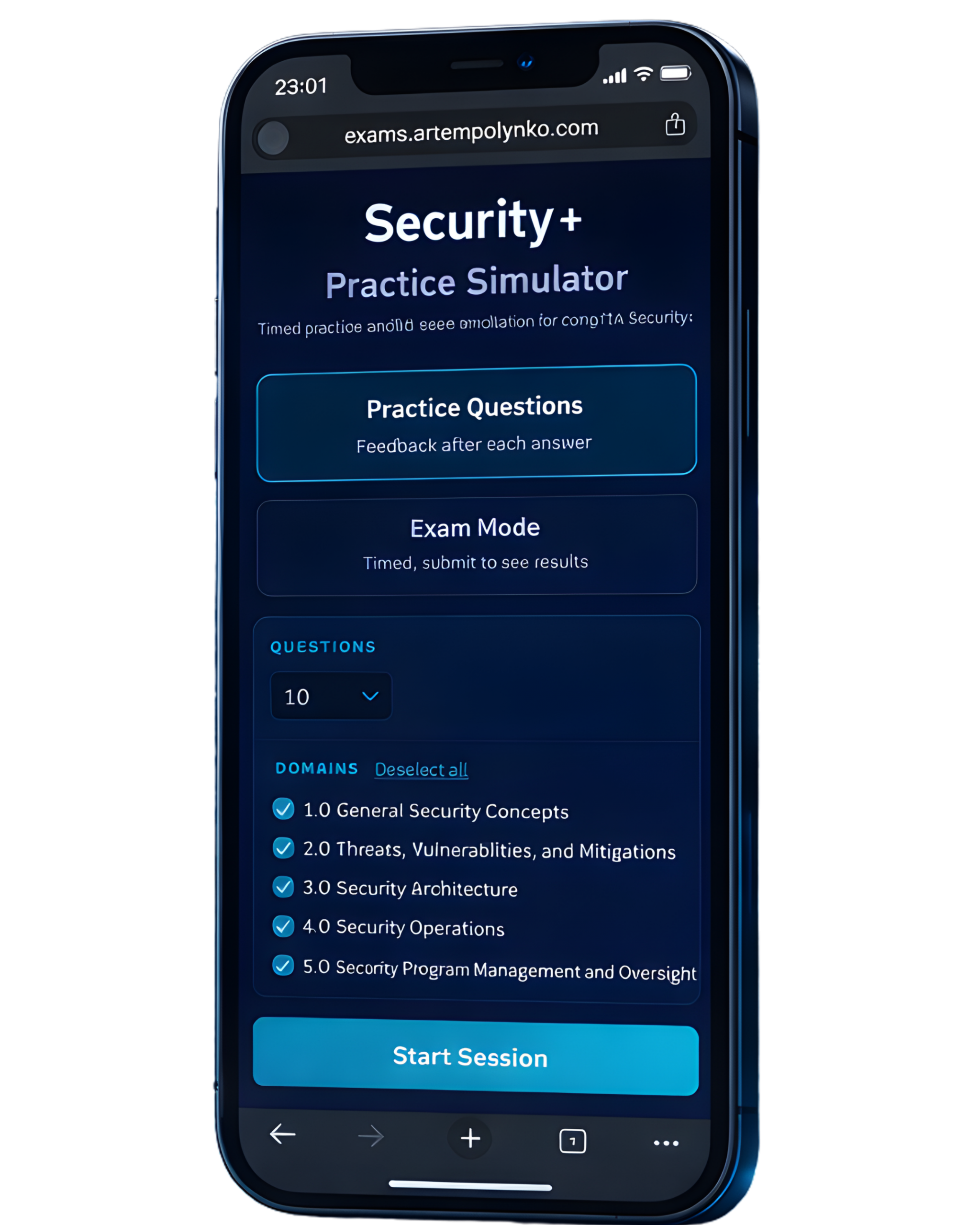
What is the Practice Exam Simulator?
The Security+ Practice Exam Simulator is a free browser-based tool designed to help you prepare for the CompTIA Security+ SY0-701 exam through realistic, structured testing.
It includes both Practice Questions mode with instant feedback and Exam Mode for a full timed simulation. Questions are aligned with official Security+ objectives and distributed across all five domains.
The simulator includes a structured question bank of 300 original Security+ practice questions, giving you enough coverage to reinforce all SY0-701 domains without repetition fatigue.
This is not a dump site. Questions are original and built for learning and understanding, not memorization.
How the Simulator Works
You can customize your session before starting:
-
Select 10 to 90 questions
-
Choose specific domains or include all five
-
Switch between Practice Mode and Exam Mode
Practice Mode provides feedback after each answer with explanations.
Exam Mode simulates real testing conditions. You complete the session under time pressure and review results at the end, including a domain breakdown.
No signup. No tracking. Runs entirely in your browser.
Full Security+ Domain Coverage
The simulator covers all CompTIA Security+ SY0-701 objectives:
-
1.0 General Security Concepts
-
2.0 Threats, Vulnerabilities, and Mitigations
-
3.0 Security Architecture
-
4.0 Security Operations
-
5.0 Security Program Management and Oversight
You can target weak domains or simulate a balanced full exam.
This helps reinforce real exam weighting and identify knowledge gaps.
Who This Is For
This simulator is designed for:
-
Security+ certification candidates
-
Entry-level cybersecurity learners
-
Career switchers moving into IT or cloud
-
Help desk professionals preparing for Security+
-
Students studying SY0-701 objectives
If you want structured, realistic exam practice without distractions, this tool is built for you.
Think You’re Ready for the Security+?
Find out where you stand with a timed practice exam that mirrors real testing pressure and domain weighting. Identify weak areas before exam day and cover them with domain-based practice.
Most Frequent Questions
Is this Security+ practice exam simulator free?
Yes. The Security+ Practice Exam Simulator is completely free to use. There is no account required and no signup needed. You can start practicing immediately in your browser.
Does this match the current SY0-701 exam objectives?
Yes. All practice questions are aligned with the CompTIA Security+ SY0-701 objectives and distributed across all five exam domains to reflect real exam structure.
What is the difference between Practice Mode and Exam Mode?
Practice Mode provides feedback and explanations after each answer to help reinforce learning.
Exam Mode runs as a timed Security+ practice test. You complete the session first, then review results and domain breakdown at the end.
Does this simulate the real Security+ exam format?
Yes. The simulator includes a timed Exam Mode that mirrors real testing conditions. You can complete a full session and review your final score along with domain performance breakdown.
Can I choose specific Security+ domains?
Yes. You can select individual domains or include all five:
-
General Security Concepts
-
Threats, Vulnerabilities, and Mitigations
-
Security Architecture
-
Security Operations
-
Security Program Management and Oversight
This allows you to focus on weak areas or simulate a balanced exam.
How many questions can I practice at once?
You can select between 10 and 90 questions per session, depending on how much time you want to dedicate.
Is this affiliated with CompTIA?
No. This is an independent educational tool created for exam preparation. Security+ is a registered trademark of CompTIA.
How should I use this tool to prepare effectively?
Start with Practice Mode to understand explanations. Review weak domains. Then switch to Exam Mode to simulate real exam pressure. Repeat with longer sessions until your domain scores stabilize.
How many questions are in the simulator?
The simulator includes a bank of 300 original Security+ practice questions. Each session randomly selects questions based on your domain and question count selections.