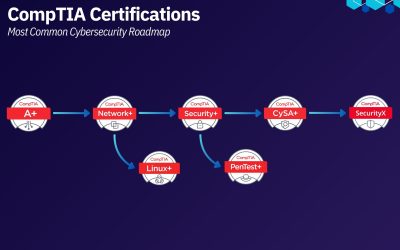
The CompTIA Security+ certification is one of the most widely recognized entry-level credentials in cybersecurity.
It validates foundational knowledge across key areas such as threat detection, system security, risk management, and incident response.
The current version of the exam (SY0-701) places greater emphasis on practical understanding. Candidates are expected not only to recognize concepts, but to apply them in realistic scenarios across cloud, on-premise, and hybrid environments.
This guide provides a structured overview of the exam, including domain coverage, format, and a practical approach to preparation.
What the Security+ Certification Covers
The CompTIA Security+ certification covers the core knowledge required to understand how security is implemented, managed, and maintained across systems.
It focuses on how threats are identified and mitigated, how secure systems are designed, and how security is monitored and maintained in real environments. This includes understanding common attack methods, applying appropriate security controls, working with secure network and cloud architectures, and supporting processes such as incident response and risk management.
Rather than focusing on a single tool or technology, Security+ covers underlying security principles that apply across different systems and environments, forming a foundation for a wide range of security tasks.
Security+ Exam Overview
The SY0-701 exam follows a standardized structure defined by CompTIA.
| Category | Details |
|---|---|
| Questions | Maximum of 90 questions |
| Time Limit | 90 minutes |
| Question Types | Multiple-choice and performance-based questions (PBQs) |
| Scoring Scale | 100 to 900 |
| Passing Score | 750 |
| Delivery | Pearson VUE testing centers or online proctoring |
Performance-based questions simulate real-world tasks such as log analysis, configuration review, and identifying vulnerabilities in systems.
Security+ Exam Domains and Weights
The CompTIA Security+ exam is divided into five domains, each representing a core area of cybersecurity knowledge and practice. Every domain is assigned a specific weight, which indicates how frequently it appears on the exam and how much it contributes to your final score.
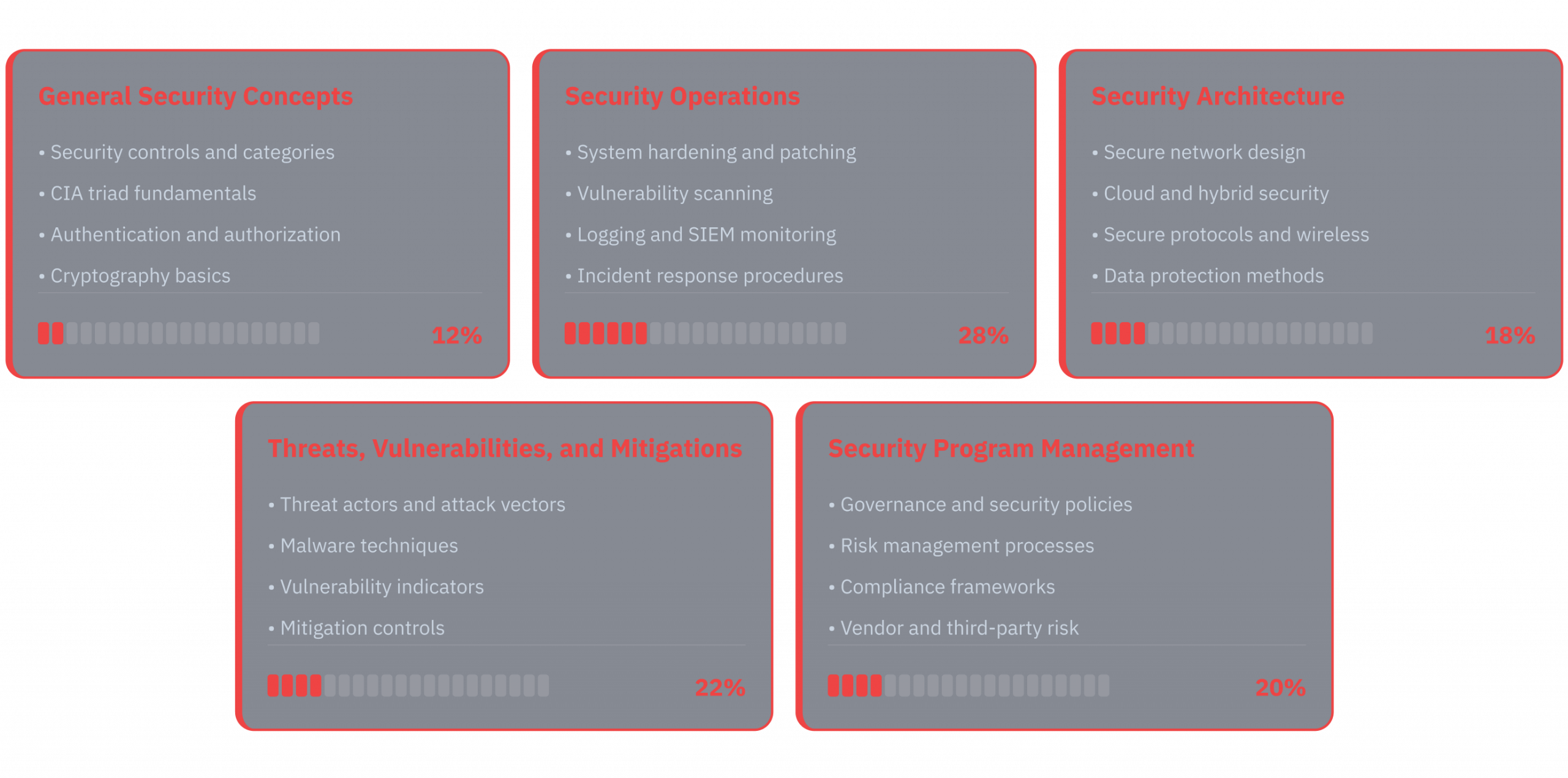
1. General Security Concepts (12%)
This domain covers foundational knowledge used across all other areas.
Key topics:
- CIA triad (Confidentiality, Integrity, Availability)
- Authentication, authorization, and accounting (AAA)
- Zero Trust principles
- Security controls (preventive, detective, corrective)
- Basic cryptography concepts
How to approach it:
Focus on understanding definitions and how these concepts are applied in real environments.
This domain is smaller, but it forms the base for more advanced topics.
2. Threats, Vulnerabilities, and Mitigations (22%)
This domain focuses on identifying and responding to common threats.
Key topics:
- Malware types (ransomware, trojans, spyware)
- Social engineering attacks (phishing, pretexting)
- Web vulnerabilities (XSS, SQL injection)
- Network attacks (DoS, MITM)
- Vulnerability scanning and penetration testing basics
How to approach it:
Do not memorize lists. Instead, focus on:
- How each attack works
- What indicators it leaves behind
- How it is mitigated in practice
This is one of the most tested areas.
3. Security Architecture (18%)
This domain covers how systems are designed securely.
Key topics:
- Network segmentation and secure design
- Cloud models (IaaS, PaaS, SaaS)
- Secure protocols (HTTPS, SSH, TLS)
- Identity and access management (IAM)
- Virtualization and container security
How to approach it:
Focus on understanding:
- Why architectures are designed in certain ways
- How components interact (e.g., firewalls, load balancers, identity providers)
Expect scenario-based questions.
4. Security Operations (28%)
This is the largest and most important domain.
Key topics:
- Logging and monitoring (SIEM concepts)
- Incident response process
- Digital forensics basics
- Endpoint detection and response (EDR)
- Backup and recovery
How to approach it:
This domain is heavily practical.
Focus on:
- Reading logs
- Identifying suspicious activity
- Understanding response steps
Many performance-based questions (PBQs) are aligned with this domain.
5. Security Program Management and Oversight (20%)
This domain focuses on governance, risk, and compliance.
Key topics:
- Risk management frameworks
- Security policies and procedures
- Compliance requirements
- Vendor risk and third-party management
- Business continuity and disaster recovery
How to approach it:
Understand:
- How organizations manage risk
- Why policies exist
- How compliance impacts technical decisions
This domain often appears in scenario-based questions.
Key Takeaway
Security+ is not evenly distributed.
Focusing more on high-weight domains significantly improves your chances of passing, especially when combined with practice questions and scenario-based learning.
How to Pass the Security+ Exam
The CompTIA Security+ exam is designed to test applied understanding, not just memorization.
Many questions are scenario-based and require you to choose the best answer, not just a correct one.
This makes exam strategy just as important as content knowledge.
Understanding Question Types
You will encounter two main formats:
Multiple-Choice Questions
These test your understanding of:
- Concepts (e.g., encryption types, protocols)
- Attack scenarios
- Security best practices
Approach:
- Read the question carefully
- Identify what is actually being asked
- Eliminate clearly incorrect answers first
Performance-Based Questions (PBQs)
These simulate real-world tasks such as:
- Analyzing logs
- Matching controls to scenarios
- Identifying vulnerabilities
- Configuring basic security settings
Approach:
- Focus on understanding the task, not rushing
- Look for keywords that indicate the objective
- Apply logical reasoning based on how systems work
PBQs are often placed at the beginning of the exam, but you can skip them and return later.
Time Management Strategy
You have 90 minutes to complete up to 90 questions, which means you cannot spend too much time on any single item.
A practical approach is to move through the exam in phases:
- First pass: Answer all straightforward questions quickly to secure easy points
- Skip questions that require more time or involve complex scenarios
- Flag uncertain questions and return to them after completing the rest
Performance-based questions (PBQs) can take significantly more time, so it is often effective to skip them initially and come back once you have completed the multiple-choice section.
Managing time this way helps ensure that you maximize your score by completing as many questions as possible before focusing on more difficult ones.
How to Read Questions Effectively
Security+ questions are often written with additional context, which can make them seem more complex than they are.
The key is to identify what the question is actually asking.
Focus on:
- The specific requirement (e.g., “best control”, “most secure”, “least privilege”)
- Keywords that define constraints (e.g., cost, speed, usability, minimal impact)
- The context of the scenario, including environment or role
Many questions include multiple correct answers, but only one that best fits the situation. This is why understanding the intent of the question is critical.
Avoid overanalyzing or adding assumptions. In most cases, the correct answer aligns with standard security practices and the most practical solution for the given scenario.
Common Mistakes to Avoid
Preparing for the CompTIA Security+ exam is not just about what you study, but also how you approach the process. Many candidates cover the right topics but make avoidable mistakes that reduce their overall performance.
Understanding these common pitfalls can help you use your time more effectively and focus on what actually improves your results.
1. Memorizing Without Understanding
Security+ requires context.
Instead of memorizing:
- Definitions
Focus on:
- How concepts are used
- When to apply them
2. Ignoring High-Weight Domains
Spending too much time on smaller domains can reduce your overall score.
Prioritize:
- Security Operations
- Threats and Vulnerabilities
These appear more frequently.
3. Skipping Practice Questions
Practice questions are essential for:
- Understanding exam wording
- Identifying weak areas
- Improving decision-making speed
Reviewing incorrect answers is especially important.
4. Overloading with Resources
Using too many courses or books can create confusion.
Instead:
- Choose one main resource
- Use practice questions to reinforce learning
5. Poor Time Management During the Exam
Spending too long on one question can affect your overall performance.
Move on when needed and return later.
Security+ 30-Day Study Plan
This 30-day study plan is structured to align with how the Security+ exam is designed and tested.
It focuses on building understanding first, then reinforcing it through practice, and finally consolidating knowledge before the exam.
A consistent schedule of 2–3 hours per day is recommended.
Day 1: Understand the Exam
Start by building clarity on what you are preparing for.
Focus areas:
- Review all Security+ domains and understand what topics are tested
- Learn the exam format, scoring system, and question types
Setup:
- Choose a primary course (e.g., Professor Messer or Jason Dion)
- Create a consistent daily study schedule
Days 2–20: Core Learning Phase
This is the main learning period where you cover all exam domains.
Course progress:
- Complete a full Security+ course covering all domains
- Take structured notes while learning key concepts and terminology
Concept understanding:
- Revisit difficult topics until they are clear
- Use additional explanations or tools if concepts are confusing
The goal during this phase is not speed, but clarity and retention.
Days 20–25: Practice Phase
Once core concepts are covered, shift your focus to application.
Practice exams:
- Start taking realistic Security+ practice tests
- Use exam simulators where possible
Focus areas:
- Understand how questions are structured
- Identify patterns in scenario-based questions
Weak areas:
- Identify domains where your scores are consistently lower
- Review incorrect answers and revisit those topics
If practice questions feel difficult, return to core topics before continuing.
Days 26–29: Final Review
This phase is focused on consolidation and confidence.
Exam preparation:
- Schedule your exam to commit to the final stage
- Review summary notes and key concepts
Reinforcement:
- Do light practice questions
- Focus on accuracy rather than volume
Avoid introducing new topics at this stage.
Day 30: Exam Day
Keep preparation minimal and focused.
Before the exam:
- Get sufficient rest
- Review key concepts or summary notes briefly
During the exam:
- Skip difficult PBQs initially and return later
- Manage your time carefully
- Read each question slowly and focus on what is being asked
Key Takeaway
A structured approach improves both efficiency and retention.
Progressing from learning → practice → review ensures that you are not only familiar with the material, but able to apply it in the exam environment.
Security+ Study Resources
Preparing for the CompTIA Security+ exam is most effective when you combine structured learning with targeted practice and focused revision.
The goal is to keep your resources simple, but aligned with how the exam is actually tested.
1. Primary Learning Resources
Start with one structured course or book that covers all exam domains.
Recommended options include:
- Professor Messer Security+ course
- Jason Dion Security+ course
- Official CompTIA Security+ Study Guide
These provide full coverage of exam objectives and help build a strong foundation.
2. Downloadable Study Materials
To support your preparation, you can use structured materials designed specifically for exam-focused learning.
Full Study Guide
A complete breakdown of all Security+ domains and key concepts.
Useful for building understanding from start to finish and revisiting topics during your study process.
Pre-Exam Refresher
A condensed version of the most important concepts.
Best used in the final days before the exam to quickly review key areas and reinforce memory.
100 Practice Questions
A curated set of questions covering core topics.
Helps you understand how questions are structured and identify areas that need improvement.
3. Security+ Practice App
A dedicated practice app can help reinforce concepts through repetition and structured testing.
It allows you to:
- Practice questions by domain
- Simulate exam conditions
- Track weak areas and improve over time
This is especially useful during the practice and final review phases.
4. How to Use These Resources Together
A simple and effective setup:
- Use a primary course to learn concepts
- Use the full study guide for structured coverage
- Practice regularly with questions and the app
- Use the refresher before the exam
This combination ensures you move from learning → practice → reinforcement.
Final Thoughts
Preparing for the CompTIA Security+ exam requires more than just covering all topics. The key is to focus on understanding how security concepts are applied in real scenarios, not just memorizing definitions.
A structured approach, consistent practice, and targeted review of weak areas will have the greatest impact on your results. Prioritizing high-weight domains, working through practice questions, and reinforcing concepts over time will help you build both confidence and exam readiness.
Security+ is often the first step into cybersecurity, but the knowledge you gain while preparing for it extends beyond the exam. It forms a practical foundation that can be applied across different roles and environments as you continue to develop your skills.
Most Frequent Questions
How long does it take to study for Security+?
Most candidates prepare for Security+ in 3 to 6 weeks with consistent study. A structured 30-day plan with 2–3 hours per day is enough for many learners, especially when combined with practice questions and regular review.
Is the Security+ exam difficult?
Security+ is considered beginner to intermediate, but it is not purely theoretical. The exam focuses on applying concepts in real-world scenarios, which makes it more challenging than simple memorization-based tests.
What score do you need to pass Security+?
The passing score for the Security+ exam is 750 on a scale of 100 to 900. The exam includes up to 90 questions and must be completed within 90 minutes.
What topics are covered on the Security+ exam?
The exam covers five main areas: security fundamentals, threats and vulnerabilities, secure architecture, security operations, and governance, risk, and compliance. These topics reflect how security is implemented and managed across real environments.
How many questions are on the Security+ exam?
The exam includes up to 90 questions, which may be a mix of multiple-choice and performance-based questions (PBQs). PBQs simulate real-world tasks such as analyzing logs or identifying vulnerabilities.
What are performance-based questions (PBQs)?
Performance-based questions are interactive tasks that test your ability to apply knowledge in practical scenarios. These may involve analyzing logs, matching controls to situations, or identifying misconfigurations.
Do you need experience before taking Security+?
No prior cybersecurity experience is required, but having basic IT knowledge (such as networking and operating systems) can make preparation easier. Security+ is often used as a starting point for transitioning into cybersecurity.
Is Security+ enough to get a cybersecurity job?
Security+ can help you qualify for entry-level roles, but it is usually not enough on its own. Combining it with hands-on practice, labs, and real-world projects significantly improves your chances of getting hired.